
Programming SPIKE Essential in Word Blocks: Intermediate Course

Are your students ready for more? Stay with LEGO Education SPIKE Essential and move with them to Word Blocks. A 25-project program for grades 1-3 guides children toward more conscious coding: using loops, sensors, variables and conditional statements.

What you get with the course

Word Blocks teacher training

Practical preparation for programming robots in Word Blocks.

25 SPIKE Essential lessons

A structured program that develops students' skills step by step.

Training recording

Learn when it fits your schedule and return to the recording during the licence period.

Student access

Instructions and materials available directly on the RoboCamp platform.

1:1 consultation

An individual online meeting with a RoboCamp trainer.

Teacher certificate

Confirmation that you completed the training.

Course materials and the training recording are available throughout the active licence period.

Course overview

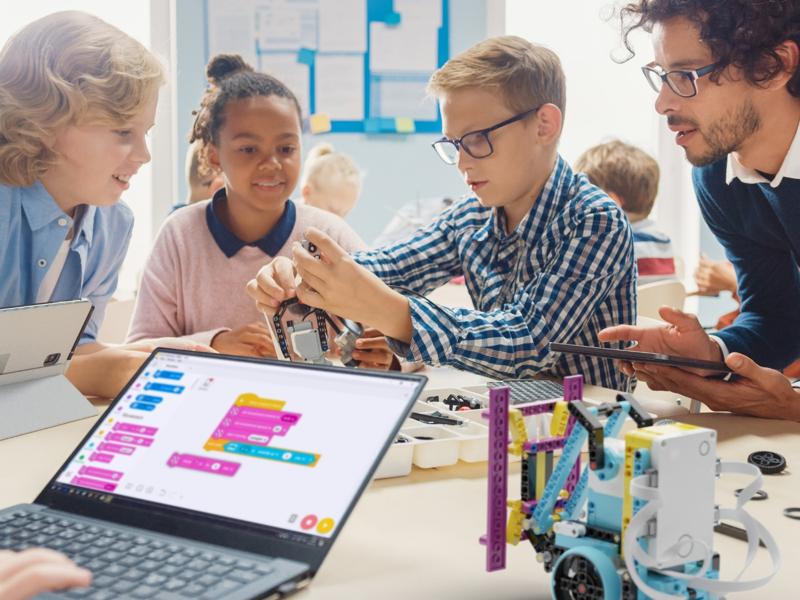
SPIKE Essential can do more than Icon Blocks. When your students are ready for the next stage, you can continue using the same set, this time to teach more advanced programming in Word Blocks.

We arranged 25 projects into a logical learning path. Students begin with simple sequences and motor control, then learn about mobile robots, loops, events, sensors, variables and conditional statements. First they define exactly what the robot should do, and over time they learn to program it so that it reacts differently in different situations.

The course was prepared primarily for students aged 7-9. Word Blocks is a visual language with text elements, so it works best with groups of children who can already read comfortably.

Need a custom quote for your school?

Need access for several teachers, more than one course, or a quote for purchase approval? Tell us what you need and we’ll prepare an offer for your school.

Is this course right for you?

For grades 1-3 ready for Word Blocks

The course was prepared for children aged 7-9. It continues visual programming with colourful code blocks that include text elements. This is a good moment to move into Word Blocks for students who can already read short instructions.

As the next step after the beginner course

If you have already worked in SPIKE Essential Icon Blocks, this course lets you move smoothly into more advanced programming without changing sets. Children already know the SPIKE Essential elements and how to work with electronics, so they can focus on new possibilities in code.

For lessons and extracurricular classes

Most projects take about 60 minutes. Depending on the topic and the pace of student work, a lesson may take about 45 to 90 minutes. One SPIKE Essential set is enough for 2-3 students working together.

SPIKE Essential Intermediate Programming course includes:

Teacher preparation

Training in Word Blocks programming - You learn the environment, the most important block categories and ways to control motors, movement and sensors. You can watch the recording when you need it.
- The course also includes an individual consultation with a RoboCamp trainer and a named certificate.

Program for students

25 projects from Word Blocks basics to increasingly advanced programs - At the beginning, students control motors and create simple sequences. Later they work with mobile robots, loops, sensors and variables, followed by conditional statements, nested loops, logical operators and elements of randomness.
- New concepts appear when they are needed to complete a specific task. Students use them so that the robot moves, reacts to a sensor or behaves differently depending on the situation.
- The course includes 25 lessons arranged as a complete teaching path. You can use the projects as a coherent sequence or choose lessons that fit your group.

Materials for teaching

Platform for teachers and students - Students use the instructions directly on the RoboCamp platform. Building and programming are divided into clear steps, so you do not need to prepare separate materials before each lesson.
- You decide which lessons are available to individual students. You can give the whole class the same project, or assign different tasks to different groups.

How it works

Get access
The course, training and ready-to-use materials are available after the licence is activated.
Prepare for class
Watch the Word Blocks training recording before you start teaching.
Teach the next lessons
Use ready-made lesson plans and student materials.

Lesson plans in this course

25 projects guide students from the basics of Word Blocks toward more advanced programming. The three examples below show how the level of tasks changes during the course.
Gantry Crane

Gantry Crane

Lesson time: 45-90 min

Student age: 7-9

Students build a gantry crane with a hoist and program its movement using a motor. By controlling the model from the screen, they check how the direction of motor rotation affects the mechanism and learn a practical use of a belt transmission.
Connections with early primary education: computing and technology Students connect program commands with the movement of a real construction, learn how a hoist and crank mechanism work, and check how changes in control affect the model.
Programming with an immediately visible effect Changing a command on the screen changes how a real mechanism works. This means new code blocks are not abstract: students immediately see what they can use them for.
Bulldozer

Bulldozer

Lesson time: 45-90 min

Student age: 7-9

Students build a driving robot and program its movement using two motors. They learn differential steering and movement blocks that let them control the direction and speed of the model.
Connections with early primary education: computing, mathematics and technology Students combine the work of two motors, observe the relationship between motor movement and the robot's driving direction, and test how changes in the program affect the construction.
From controlling a motor to controlling a robot This is an important step in the course: students are no longer starting a single mechanism, but coordinating two drives to control the movement of the whole construction.
Frog

Frog

Lesson time: 45-90 min

Student age: 7-9

Students build a frog powered by a crank mechanism and create a program in which the next action depends on a random result. They use an if... then... else conditional statement, random input and sounds, so the model does not behave the same way every time.
Connections with early primary education: computing, mathematics and technology Students learn a simple algorithm with an element of randomness, check how a condition affects the further course of a program and observe the movement of a construction using a crank mechanism.
First decisions in a program Instead of creating only one fixed sequence of commands, students define different possible robot reactions. The program starts to take a different action depending on which condition is met.

Want to explore more lessons?

View all lesson plans in this course

Cosmic Chase - a SPIKE Essential robot in motion

See what one of the LEGO Education SPIKE Essential course projects looks like. In Cosmic Chase, students connect a program sequence with movement, the LED matrix and sound.

The same set. The next level of programming.

Use SPIKE Essential for longer. As students develop their skills, you do not need to replace the equipment right away. Word Blocks lets you use the same sets to teach new and more advanced programming concepts.
Move naturally from Icon Blocks to Word Blocks. Children work with robots and elements they already know, while learning a more advanced programming language. The difficulty level of the code changes, but the whole way of working does not.
From "do this" to "what should happen if...". At first, a student gives the robot simple commands. Later, they use sensors, variables and conditions, so they can define how the robot should react to different situations.
Code has a visible effect. Motors, sensors, transmissions and mechanisms help explain concepts that could remain abstract on the screen alone. A student changes the program and immediately sees the result.
Each lesson follows from the previous ones. The order of lessons is not accidental. New concepts appear gradually and build on the skills students have already learned.
You know what to do next. You do not need to look for another lesson idea every week. You have 25 planned projects, step-by-step instructions and materials for students.

Prepare to work in Word Blocks

Moving from Icon Blocks to Word Blocks brings new possibilities for the teacher as well. That is why the course includes training where you learn the environment and the solutions later used by students.

Training included with the course

approx. 90 minutes

Programming LEGO SPIKE Prime robots in Word Blocks

You learn how to use Word Blocks to program robots during classes with students. The training leads from the basics of motor control to work with sensors, loops, conditional statements, variables and parallel scripts.

You learn each concept through a specific project, so you can see how individual program elements connect with the robot construction and how they can be used in classroom work.

During the training, you will learn examples such as:

Spirograph — motor control and precise motor positioning.

Forklift — robot movement and reaction to distance sensor data.

Music Box — loops, conditional statements and the color sensor.

Trough Conveyor — variables, event counting and parallel scripts.

After the training, you will know how to:

program motor movement and position in Word Blocks,
use sensors to control robot behaviour,
use loops, conditional statements and variables,
recognise basic errors in the program and construction,
guide students from simple programs to more complex projects.
Programming LEGO SPIKE Prime robots in Word Blocks

Learn when you need it

The training recording is available throughout the active licence period. You can watch it before starting the course and return to it whenever you need to.

You also have time just for yourself

The course includes 30 minutes of individual online consultation with a RoboCamp trainer. You can discuss a specific lesson, class organisation or a problem that appeared while working with students.

Confirm the skills you have gained

After completing the training, you can receive a named teacher certificate. Use it as clear evidence that you are developing the skills needed to teach robotics and programming at your school.

A platform that makes independent student work easier

Students use the instructions directly on the RoboCamp platform. All building and programming materials are in one place, and you decide which lessons are available to individual students.

Student access included

Students receive access to building instructions, programming instructions and multimedia materials as part of the course. They can use them on their own devices and move through the next stages of the project together with the teacher.

Step-by-step instructions

Each lesson guides students through building and programming the model. Students know what to do next, and you can spend more time with those who need help at that moment.

Everyone can work at their own pace

You can make lessons available to selected students, which makes it easier to organise work when not all pairs finish the project at the same time.

Frequently asked questions

Yes. SPIKE Essential can be programmed both in the simpler Icon Blocks environment and in Word Blocks. This course uses Word Blocks, so students can work with loops, events, sensors, variables and conditional statements while still using the same SPIKE Essential sets.
Icon Blocks use simple symbols and work well even for children who are only beginning to read. In Word Blocks, the function of each block is described partly with text, and the available commands make it possible to create more advanced and complex programs. That is why the intermediate course moves into Word Blocks.
It is not required, because the first lessons introduce Word Blocks from the beginning. The beginner course is, however, very good preparation for this stage: children already know the SPIKE Essential set, the basics of programming and the way of working during lessons.
Yes, as long as they can already read short instructions comfortably and are ready to work in Word Blocks. For younger children or groups that are still learning to read, the SPIKE Essential course in Icon Blocks is a better starting point.
The course was prepared primarily for children aged 7-9, that is students in grades 1-3 of primary school.
Depending on the project and the pace of the class, activities take about 45-90 minutes. Most projects can be completed in about 60 minutes.
One set is enough for 2-3 students who build, program and test the robot together. You can therefore adjust the number of sets to the size of the class.
Yes. The English offer treats the course as a complete 25-project teaching path, with the materials available within the active licence.
The training lasts about 90 minutes and focuses on programming robots in Word Blocks. You learn the environment, the most important categories of blocks and practical ways to control motors and sensors. For the English offer, the training is provided as an on-demand recording.
The licence includes 12 months of access for one teacher and student access. During that time you can use the lesson plans, platform materials and the training recording.
Yes. The projects combine programming with building, mechanics, movement, logical thinking and problem-solving, so they fit well with work in grades 1-3.

Get access to the course

SPIKE Essential Programming: Intermediate Course
One on-demand teacher training available during the licence period
Training recording available throughout the licence period
25 projects in the full course program
Student materials and access
1:1 consultation with a RoboCamp expert
Teacher certificate after completing the training
1 teacher - 12 months access
299
$