3D Modelling and Printing Course: Parts for LEGO SPIKE™ Prime robots

A guided robotics course where students design and 3D print functional parts in Tinkercad — then integrate them into LEGO® Education SPIKE™ Prime robots.
Get a quote

Course overview

Robotics with 3D Modelling & Printing is a guided STEAM course in which students design functional parts in Tinkercad, produce them on a shared 3D printer, and integrate them into working LEGO® Education SPIKE™ Prime robots.

Rather than relying solely on ready-made elements, learners create components that enable motion, improve precision, or allow measurement, then test how their designs perform within real mechanisms. Throughout the course, students connect CAD, mechanics, sensors, and programming while building devices such as plotters, measuring instruments, and kinetic machines.

The course develops practical engineering thinking and problem-solving skills while remaining classroom-ready and fully guided for teachers, including those working with one shared 3D printer.

Is this course right for you?

Schools, clubs and camps

For institutions that want a structured robotics course integrating 3D modelling and printing, for longer lessons, project-based work, and classrooms with one shared 3D printer.

Teachers & facilitators

For educators who want a ready-to-teach SPIKE™ Prime course that meaningfully integrates 3D modelling and printing, without prior experience in CAD or advanced robotics.

Students aged 10+

For learners who already know basic robot building or coding and are ready to explore how design decisions, mechanisms, sensors, and programs interact in real systems.

What the 3D Modelling Robot Parts course includes

Complete multi-lesson curriculum

Project-based lesson sequence Students work through guided projects that gradually increase in complexity, combining CAD design, 3D printing, mechanical systems, and programming.
Functional robotics builds Projects focus on real mechanisms such as plotting systems, measuring devices, and motion-driven machines, highlighting the practical role of designed and printed parts.

Teacher-focused resources

Teacher licence with student access Teachers manage student access to lesson instructions, allowing learners to follow guided steps while maintaining full classroom control.
Guided, classroom-ready lessons Each lesson follows a clear structure — from concept and design to building, testing, programming, and presentation — reducing preparation time and supporting confident delivery.
Implementation support Teachers can receive assistance with course setup, lesson flow, and technical questions related to SPIKE™ Prime or 3D printing.

Online learning platform

Browser-based access All lesson instructions and multimedia materials are available online, making classroom setup simple and installation-free.
Teacher-controlled access Educators decide which lesson content is available and can adapt pacing for different groups or classroom scenarios.

How it works

Get access
Choose your access plan and log in to the e-learning platform.
Pick a project
Launch any of the 10 projects with just a few clicks.
Teach with confidence
Focus on guiding students while the platform gives instructions.

Lesson plans at a glance

3 out of 10 engaging lessons that you can teach in your classroom. Get a quote to receive full curriculum.
Click to browse all lessons in this course.

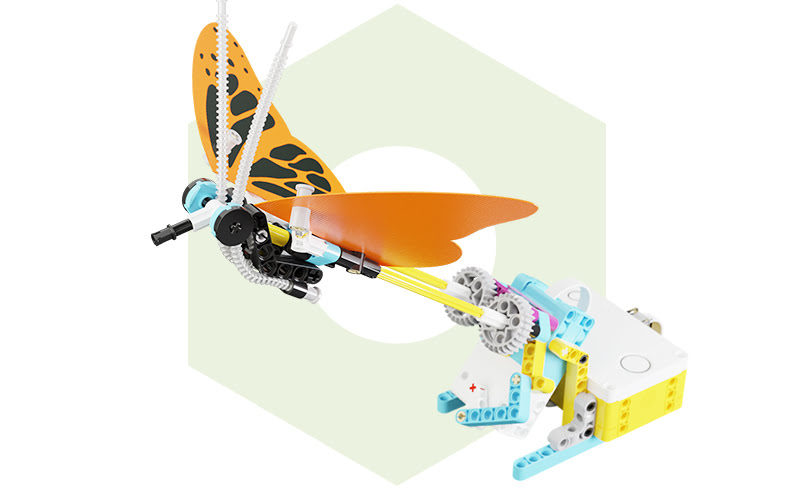
Butterfly

Lesson time: 85 min (excl. printing)

Student age: 10+

Students design and 3D print butterfly wings in Tinkercad using an import-and-decorate workflow (import SVG, scale, add Scribble decorations, set thickness, create two mounting holes, mirror, export STL). They attach the printed wings to a SPIKE™ Prime build and program a flapping motion controlled by hub buttons.
Accessible entry into 3D printing for robotics The CAD process is visual and approachable, while programming introduces meaningful control logic (a speed variable, button conditions, limits from 0–100, and continuous loops). This structure supports mixed-ability groups: students can succeed quickly and extend their work through design refinement and tuning.
Strong engagement and ownership Students adjust wing speed live using the hub’s buttons, and the printed wings give the model a personalized, purposeful character.

Plotter

Lesson time: 105 min (excl. printing)

Student age: 10+

Students build a 2-axis drawing robot (plotter) and use three 3D-printed racks to enable precise movement. They program the robot to draw an algorithmically generated square spiral, turning code into a visible and measurable result.
Precision engineering with clear feedback Students connect CAD accuracy, mechanical alignment, calibration, and programming logic into one coherent system. The final drawing immediately reveals whether the system is built and programmed correctly.
Authentic machine experience Observing a robot produce a geometric spiral demonstrates how mechanical setup and program logic influence accuracy and repeatability.

Anemometer

Lesson time: 100 min (excl. printing)

Student age: 10+

Students design an anemometer cup with a LEGO-compatible handle in Tinkercad Codeblocks, export it as STL, and print it three times for the model. They build a SPIKE™ Prime anemometer with multi-stage gear reduction and use a color sensor to count rotations via a contrasting indicator, linking motion to measurable data.
From motion to measurement The gear reduction improves reliability by slowing rotation for more accurate sensor detection. Students connect mechanical ratios, sensor readings, and program logic into a functional measurement system.
Applied STEAM demonstration When airflow spins the printed cups and the system counts rotations, students experience how digital design, mechanics, and programming combine into a real instrument.

How each lesson works

Consider Each lesson begins with a guided introduction to the challenge. Teachers clarify the goal, explain the role of the 3D-printed part, and define what the system should achieve.
Create (Tinkercad) Students design a functional part in Tinkercad using step-by-step guidance. The focus is on purpose-driven design — parts are created to move, fit precisely, or enable measurement, not just to look good.
Create 2 (Building) Students build the robot using SPIKE Prime elements and the printed parts. This is where digital design meets reality, and students immediately see whether their parts fit and work as intended.
Check (Mechanisms) Before coding, students test the mechanism by hand to understand how it moves. This step helps catch mechanical issues early and teaches students to think like engineers, not just programmers.
Code (SPIKE Word Blocks) Students program the robot and observe immediate effects on the physical system, making debugging concrete and meaningful.
Celebrate Lessons conclude with demonstrations and short explanations of how the system works, creating space for reflection and assessment.
Get a quote to receive full curriculum

See the lesson in action

What your students will learn

Designing functional robot parts

Students create 3D models in Tinkercad with a clear purpose, understanding how shape, size, and structure affect mechanical behavior and integration with LEGO elements.

Integrating mechanics, sensors, and code

Students connect mechanical systems with SPIKE Prime sensors and programs, observing how changes in construction or gearing influence sensor readings and robot behavior.

Applying programming to real systems

Students use SPIKE Prime programming blocks to control and read from physical systems, learning how software logic depends on reliable mechanical and sensor input.

Engineering-style problem solving

Students test, identify issues, refine designs, and improve performance through iteration, learning to explain what was changed and why it improved the system.

Discover our online platform

See how the RoboCamp education platform supports hands-on robotics and 3D printing lessons.

Student access included

Access to lesson materials Students view step-by-step instructions and multimedia resources needed to complete each project.
Designed for group work The platform supports team-based learning and shared robotics sets.

Designed for classroom use

Clear lesson flow Lessons are structured into stages such as introduction, design, building, testing mechanisms, programming, and evaluation.
Simple navigation Teachers and students quickly access relevant materials without additional software installation.

Flexible teaching scenarios

Teacher-controlled pacing Educators decide how quickly to progress and which materials are visible at any time.
Supports differentiated instruction Different groups can work on different projects or stages, supporting mixed-ability classrooms.

Frequently asked questions

Yes. The course is designed to guide teachers step by step through 3D modelling in Tinkercad and preparing parts for LEGO® Education SPIKE™ Prime robots. No prior experience with 3D design or printing is required.
Lesson duration varies depending on the project and ranges from approximately 85 to 165 minutes (excluding printing time). The course includes 10 projects, which can be divided into more lessons if needed. It can cover a full school year, but it is not designed strictly as a year-long course.
You will need LEGO® Education SPIKE™ Prime sets, computers with access to Tinkercad for 3D modelling, and a 3D printer. The course assumes that designed parts will be printed for use with the robots.
Printing is required, but it is recommended to print parts before the lesson so they are ready to use immediately after designing. This way, students still learn through the design process without spending lesson time waiting for prints to finish.
The course works well with students working in pairs or small groups, especially when sharing a SPIKE Prime set. Teachers can adapt the setup to match their classroom organization.
Yes. You decide which materials are available to students and when. This allows you to manage pacing, divide projects into multiple lessons, and adapt the course to your schedule.

Course pricing

3D Modelling and Printing Course: Parts for LEGO SPIKE™ Prime robots
Complete 3D modelling and printing course for SPIKE™ Prime robots
10 structured projects divisible into multiple lessons
Step-by-step guidance for 3D modelling in Tinkercad
Designed for classroom use without prior 3D Modelling experience
One-year access for 1 teacher and students
299
$
1 year access